



refresh

Tracking customer debts (nasiya) in a shop

In many shops in Tajikistan, nasiya — goods sold on credit — still lives in a notebook: who took what, how much, and when they promised to pay. Notebooks get lost, handwriting is unreadable, and arguments about the amount come down to memory. Here is how nasiya works in Refresh, and what the software does not do.

Try for free
Customer debts without a notebookVideo in RussianAll videos on YouTube

Credit sales straight from the till

A credit sale is rung up at the till like any other: pick the customer and the "on credit" payment. Payments can be mixed: the customer pays part now in cash or by card and the rest goes on credit.

Every debt has a due date. Overdue debts are listed separately, and the customer's card shows the whole history: what they bought, what they paid back and what is still owed.
Repayment and control

Repayments are taken at the till — in parts or all at once. If a customer has several debts, one payment can be applied to all of them, oldest first. The money goes into the till and the reports, not into a notebook.

A customer can be given a limit — an amount above which they cannot buy on credit: Refresh will not record nasiya beyond it. Selling on credit is a separate permission for each role, so a cashier without it cannot record a debt.

Reminders and reports

The receipt can print the customer's debt — what it was, what was added and the total — once the shop switches it on in its settings.

The Grow and Pro plans include an automatic SMS reminder for overdue debts, sent through your own SMS account. The owner sees total customer debt in the reports and in the Telegram reporting bot.

What Refresh does not do

Refresh records debts; it does not lend money. It charges no interest or penalties and does not collect debts. Nasiya is kept per customer of your shop — it is not a shared register of debtors across shops.

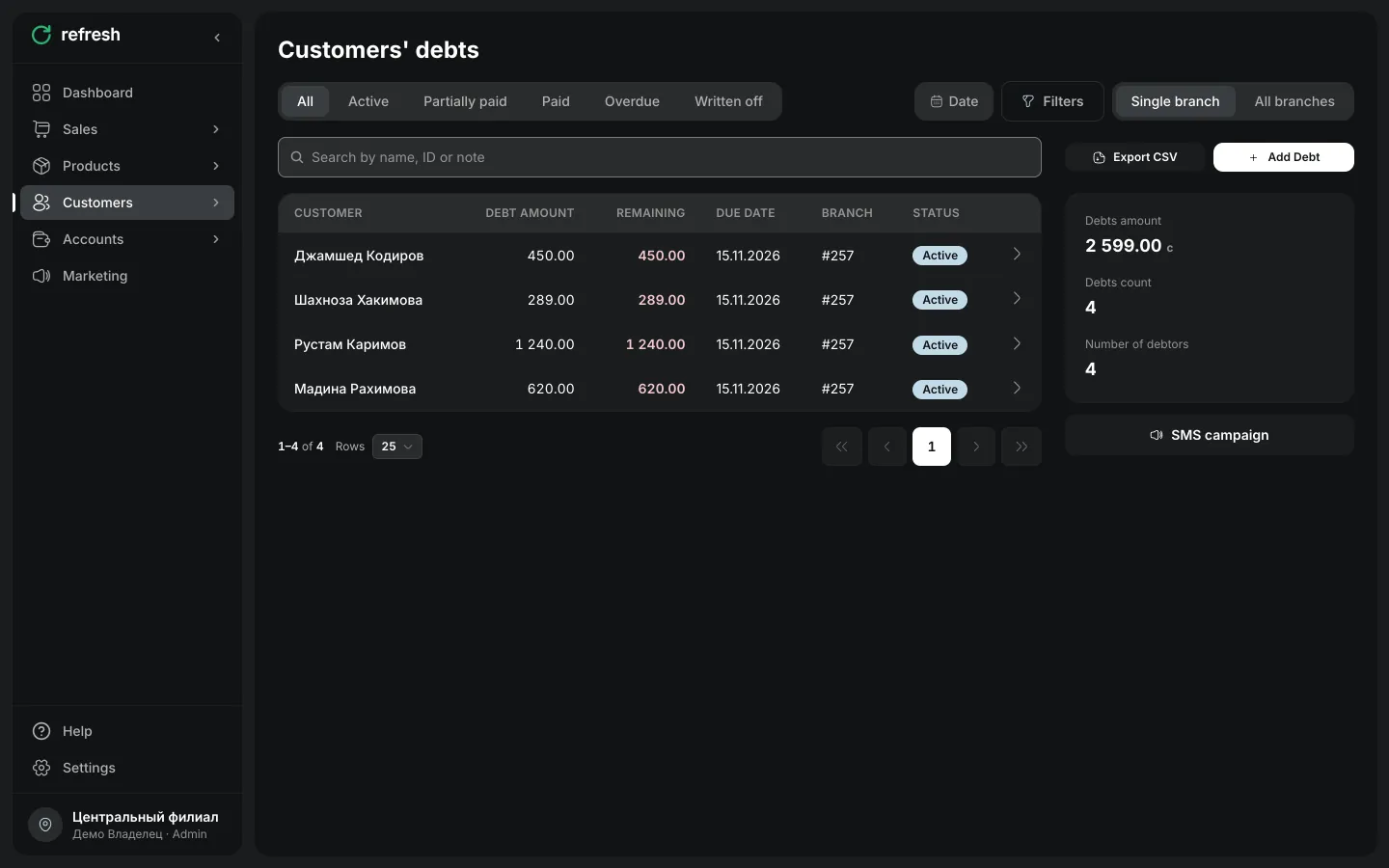
Refresh customer debt ledger: amounts, balances, due dates and statuses

Customer debts (nasiya)

Who owes what, when it is due and its status — with an SMS reminder to debtors from the same page.

Frequently asked questions

Yes. One receipt can combine cash, card and credit: the customer pays part now, the rest goes on nasiya and is repaid later at the till.

Existing debts are entered per customer, with the amount and due date. It is done once; after that, new debts appear by themselves whenever you sell on credit.

Yes, if the shop switches on the customer-debt block for receipts: the paper and digital receipts then show the debt before the purchase, the amount added and the total.

Returning goods bought on credit reduces the debt. If the customer has already paid more than they owe after the return, the difference is refunded.

Yes. Selling on credit is a separate role permission. Without it the cashier can only take payment in full, and each customer can be given a debt limit.

Start automating your shop today

Set up Refresh in 15 minutes. Free plan, no card, with support in your language.

Try for freeOnboarding and training included